Apache Iceberg Masterclass - Table of Contents
- What Are Table Formats and Why Were They Needed?
- The Metadata Structure of Modern Table Formats
- Performance and Apache Iceberg’s Metadata
- Partition Evolution: Change Your Partitioning Without Rewriting Data
- Hidden Partitioning: How Iceberg Eliminates Accidental Full Table Scans
- Writing to an Apache Iceberg Table: How Commits and ACID Actually Work
- What Are Lakehouse Catalogs? The Role of Catalogs in Apache Iceberg
- When Catalogs Are Embedded in Storage
- How Data Lake Table Storage Degrades Over Time
- Maintaining Apache Iceberg Tables: Compaction, Expiry, and Cleanup
- Apache Iceberg Metadata Tables: Querying the Internals
- Using Apache Iceberg with Python and MPP Query Engines
- Approaches to Streaming Data into Apache Iceberg Tables
- Hands-On with Apache Iceberg Using Dremio Cloud
- Migrating to Apache Iceberg: Strategies for Every Source System
This is Part 3 of a 15-part Apache Iceberg Masterclass. Part 2 covered the metadata structures of all five table formats. This article focuses on exactly how query engines use Iceberg’s metadata to avoid reading data they don’t need.
The single biggest performance advantage of Iceberg over raw data lakes is not a clever algorithm or a faster codec. It is metadata-driven data skipping. By the time a query engine begins scanning actual Parquet files, Iceberg’s metadata has already eliminated 90-99% of the files from consideration. Understanding this process explains why Iceberg tables with billions of rows can return query results in seconds.
The Scan Planning Pipeline
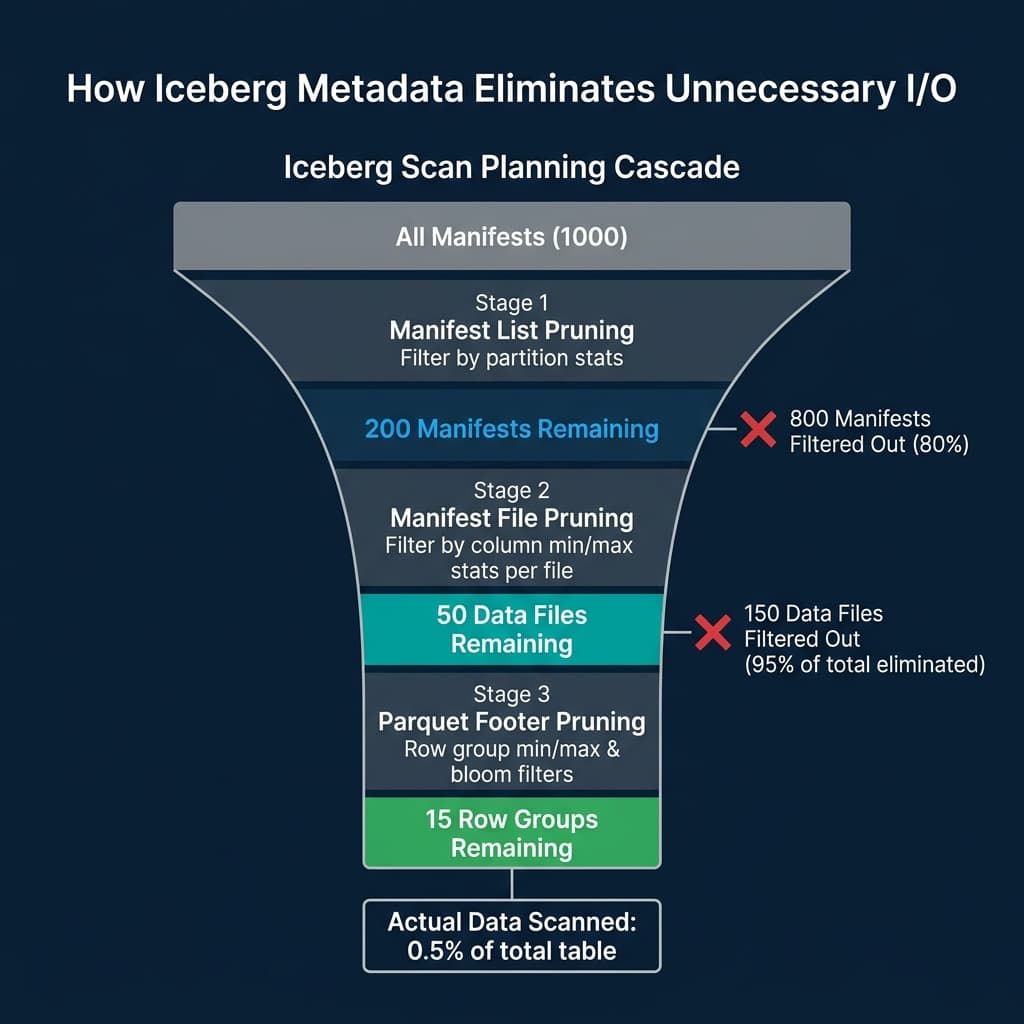
When a query engine like Dremio, Spark, or Trino receives a query against an Iceberg table, it executes a four-stage planning pipeline before reading any data:
Stage 1: Snapshot Resolution
The engine contacts the catalog to get the current metadata file location. It reads metadata.json and identifies the current snapshot. This tells the engine which manifest list represents the table’s current state.
If the query includes a time travel clause (AS OF TIMESTAMP '2024-03-01'), the engine scans the snapshot list in metadata.json to find the snapshot that was current at that timestamp. This is a metadata-only operation; no data files are touched.
Stage 2: Manifest List Pruning
The manifest list contains one entry per manifest file. Each entry includes partition-level summary statistics: the minimum and maximum values of the partition columns across all data files tracked by that manifest.
The engine evaluates query predicates against these summaries. If a query filters on order_date = '2024-03-15' and a manifest’s partition summary shows its date range is 2024-01 to 2024-02, that entire manifest is skipped. This single check can eliminate hundreds of manifest files and the thousands of data files they reference.
Stage 3: Manifest File Pruning (File Skipping)
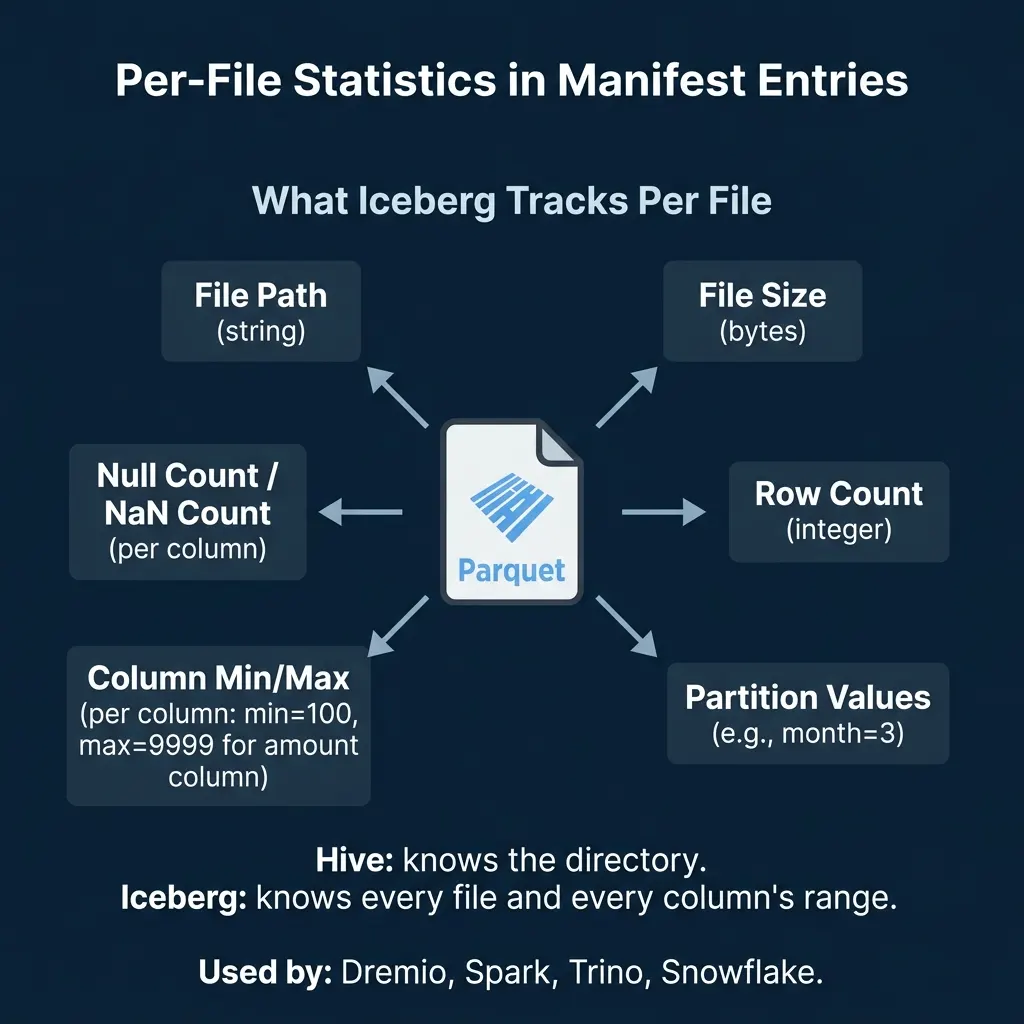
For each surviving manifest, the engine reads the individual file entries. Each entry contains:
- File path and size
- Row count
- Partition values for this specific file
- Column-level min/max values for each column
- Null counts and NaN counts per column
The engine evaluates query predicates against these per-file statistics. A query filtering on amount > 500 can skip every file whose amount column has a maximum value below 500. A query filtering on status = 'shipped' can skip files where the min and max of the status column are both 'pending' (alphabetically before ‘shipped’ in some encodings, though string pruning depends on sort order).
Stage 4: Parquet Internal Pruning
After Iceberg’s metadata has identified the relevant files, the engine reads each Parquet file’s footer. Parquet stores its own row-group-level min/max statistics. The engine can skip individual row groups within a file if their statistics exclude the query’s filter values.
If bloom filters are configured (available in Iceberg v2+), the engine can also check probabilistic membership tests for equality filters, skipping row groups where the bloom filter says the value definitely does not exist.
A Concrete Example
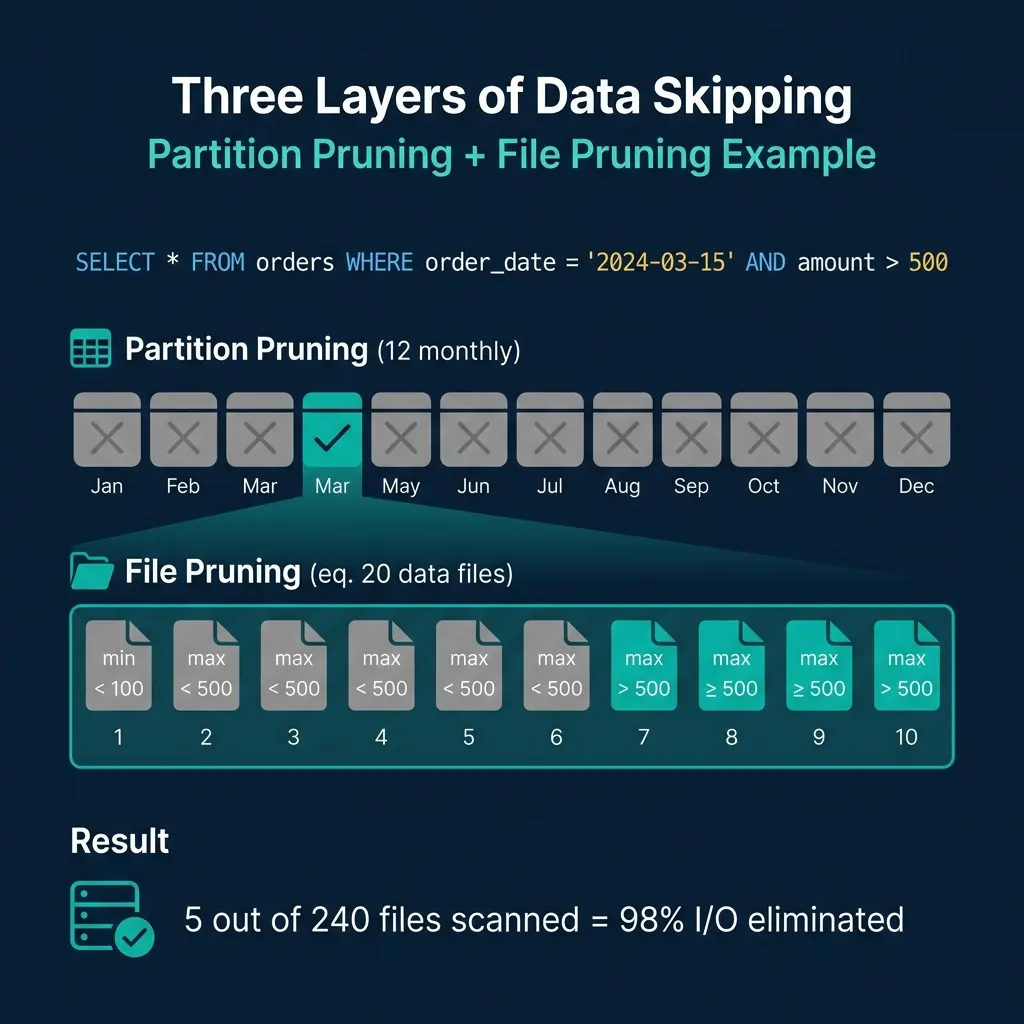
Consider a table orders partitioned by month with 12 months of data, 20 files per month (240 total files):
SELECT * FROM orders
WHERE order_date = '2024-03-15'
  AND amount > 500
Manifest list pruning: The engine checks partition summaries. 11 of 12 monthly manifests have date ranges that do not include March 2024. They are skipped. Only the March manifest is read.
File pruning: The March manifest contains 20 file entries. The engine checks each file’s amount column statistics. 15 files have max(amount) < 500, so they cannot contain any rows matching amount > 500. They are skipped. 5 files remain.
Result: 5 out of 240 files are scanned. The engine eliminated 98% of I/O through metadata alone.
What Makes Statistics Effective
The effectiveness of file skipping depends entirely on how tight the min/max ranges are per file. Two factors determine this:
Sort Order
If the amount column is sorted within each file (or approximately sorted through clustering), each file contains a narrow range of values. File 1 might have amount from 10 to 200, File 2 from 200 to 400, and so on. A filter on amount > 500 can skip the first several files completely.
If the column is randomly distributed, every file has a range of roughly min(amount) to max(amount) across the entire dataset. No file can be skipped because every file’s range overlaps every filter. Sort order turns file skipping from theoretical to practical.
Iceberg supports declaring a sort order at the table level. When engines compact data (rewrite files), they can apply this sort order to produce files with tight column ranges. Dremio’s automatic table optimization handles this without manual intervention for tables managed by Open Catalog.
File Size and Count
Smaller files mean tighter statistics per file but more manifest entries to manage. Larger files reduce metadata overhead but produce wider min/max ranges (less effective pruning). The typical recommendation is 128 MB to 512 MB per file for analytical workloads.
Too many small files (the “small file problem”) bloat manifests and slow down planning. Regular compaction merges small files into optimally-sized ones while preserving or improving sort order.
Beyond Min/Max: Other Statistics
Iceberg’s spec supports several statistical measures per column per file:
| Statistic | Purpose | Pruning Power |
|---|---|---|
| Min/Max values | Range-based filtering | High (if sorted) |
| Null count | IS NOT NULL filters | High |
| NaN count | Float NaN filtering | Moderate |
| Value count | Row count estimation | Used by optimizer |
| Distinct count | Cardinality estimation | Used by cost-based optimizer |
Engines like Dremio and Spark use the value counts and distinct counts for cost-based optimization decisions (choosing join strategies, selecting scan parallelism) even when they do not directly prune files.
Metadata Caching
Reading metadata from object storage on every query adds latency. Production engines cache metadata aggressively:
- Metadata file cache: The
metadata.jsonand manifest list are typically cached in memory. They change only when the table is updated. - Manifest cache: Manifest files are immutable (they are never modified, only replaced). Once read, they can be cached indefinitely until they are no longer referenced by any snapshot.
- Parquet footer cache: Since Parquet files are immutable, their footers (which contain row-group statistics and schema) can be cached permanently.
Dremio’s Columnar Cloud Cache (C3) caches both metadata and data on local NVMe drives at executor nodes, turning cloud storage latency into local-disk speed for frequently-accessed tables.
When Metadata Is Not Enough
Metadata-driven pruning has limits. If a filter column is not in the partition spec and the data is not sorted by that column, min/max ranges will overlap across all files and no pruning occurs. In these cases:
- Add the column to the sort order and compact the table. This is the most effective fix.
- Consider partition evolution (covered in Part 4) to add a partition transform on the column.
- Enable bloom filters for high-cardinality equality filters like user IDs or transaction IDs.
The metadata is only as good as the physical organization of the data. Well-organized tables skip 95%+ of I/O. Poorly organized tables with random data distribution skip nothing, and the metadata overhead becomes pure cost with no benefit.
Books to Go Deeper
- Architecting the Apache Iceberg Lakehouse by Alex Merced (Manning)
- Lakehouses with Apache Iceberg: Agentic Hands-on by Alex Merced
- Constructing Context: Semantics, Agents, and Embeddings by Alex Merced
- Apache Iceberg & Agentic AI: Connecting Structured Data by Alex Merced
- Open Source Lakehouse: Architecting Analytical Systems by Alex Merced