Apache Iceberg Masterclass - Table of Contents
- What Are Table Formats and Why Were They Needed?
- The Metadata Structure of Modern Table Formats
- Performance and Apache Iceberg’s Metadata
- Partition Evolution: Change Your Partitioning Without Rewriting Data
- Hidden Partitioning: How Iceberg Eliminates Accidental Full Table Scans
- Writing to an Apache Iceberg Table: How Commits and ACID Actually Work
- What Are Lakehouse Catalogs? The Role of Catalogs in Apache Iceberg
- When Catalogs Are Embedded in Storage
- How Data Lake Table Storage Degrades Over Time
- Maintaining Apache Iceberg Tables: Compaction, Expiry, and Cleanup
- Apache Iceberg Metadata Tables: Querying the Internals
- Using Apache Iceberg with Python and MPP Query Engines
- Approaches to Streaming Data into Apache Iceberg Tables
- Hands-On with Apache Iceberg Using Dremio Cloud
- Migrating to Apache Iceberg: Strategies for Every Source System
This is Part 6 of a 15-part Apache Iceberg Masterclass. Part 5 covered hidden partitioning. This article walks through the exact steps an engine takes when writing data to an Iceberg table, when the write becomes visible, and how concurrent writers are handled.
Understanding the write process is critical because it explains why Iceberg can provide ACID guarantees on top of object storage, something that seems impossible when you consider that S3, ADLS, and GCS have no built-in transaction support. The answer is that ACID lives entirely in the metadata layer, not in storage.
The Six Steps of a Write
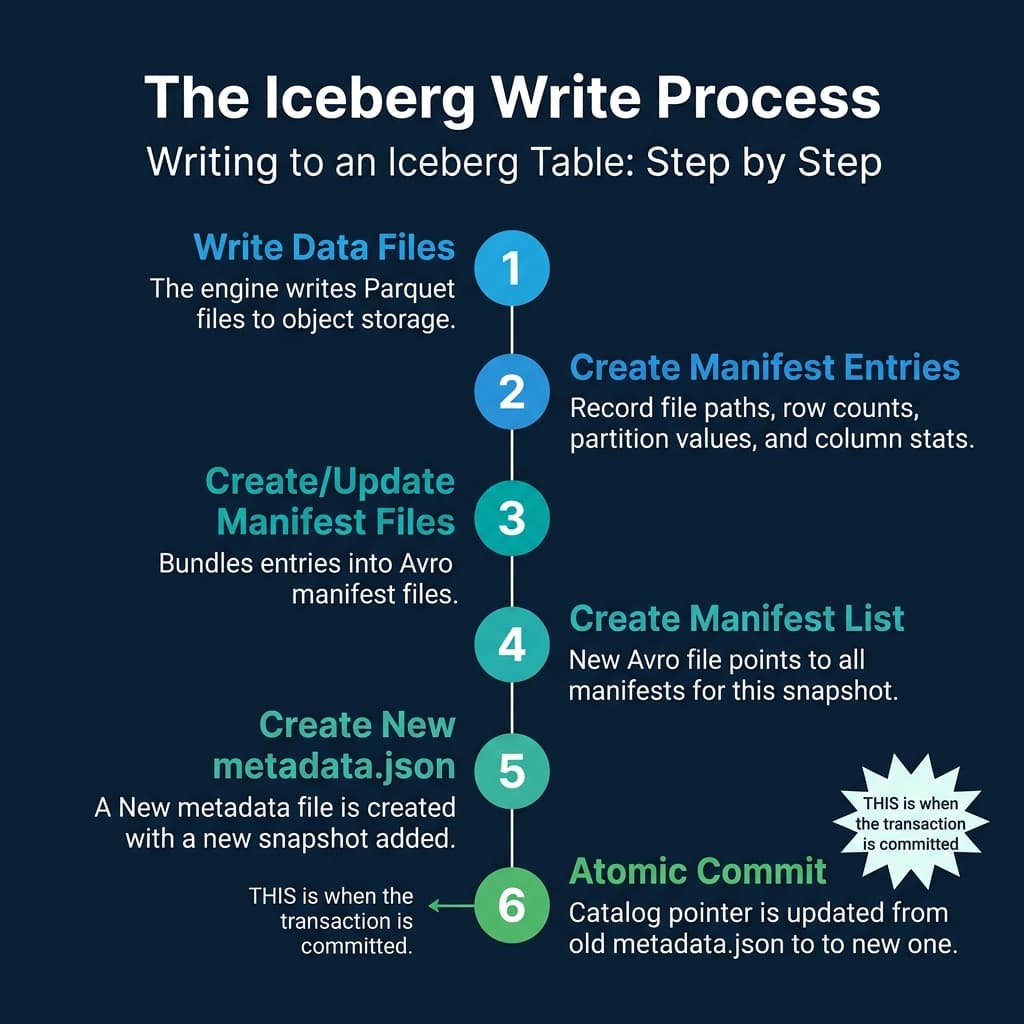
Every write operation (INSERT, DELETE, UPDATE, MERGE) follows the same six-step sequence:
Step 1: Write Data Files
The engine writes new Parquet (or ORC/Avro) files to object storage. These files are placed in the table’s data directory but are not yet referenced by any metadata. At this point, they are invisible to all readers. They are just orphan files sitting in storage.
Step 2: Create Manifest Entries
For each new data file, the engine creates a manifest entry containing the file path, file size, row count, partition values (computed using the table’s partition transforms), and column-level statistics (min, max, null count).
Step 3: Create or Update Manifest Files
The engine bundles manifest entries into Avro-format manifest files. If the write affects only a single partition, it may create one new manifest. If it touches many partitions, it may create multiple manifests. Existing manifests from previous snapshots that were not modified are carried forward by reference, not copied.
Step 4: Create a Manifest List
A new manifest list (Avro) is created that references all manifests for this snapshot: the new manifests from Step 3 plus the unchanged manifests inherited from the previous snapshot. This manifest list represents the complete state of the table after this write.
Step 5: Create New Metadata File
A new metadata.json file is written, containing the table schema, partition spec, properties, and the snapshot list. The new snapshot (pointing to the manifest list from Step 4) is appended to the list. The previous metadata.json remains in storage, unchanged.
Step 6: Atomic Commit (The Pointer Swap)
The engine asks the catalog to update its pointer from the old metadata.json to the new one. This is a compare-and-swap operation: the catalog checks that the current pointer matches what the engine expects, and only then updates it.
This is the exact moment the transaction commits. Before the swap, readers see the old snapshot. After the swap, readers see the new snapshot. There is no in-between state.
Why This Provides ACID Guarantees
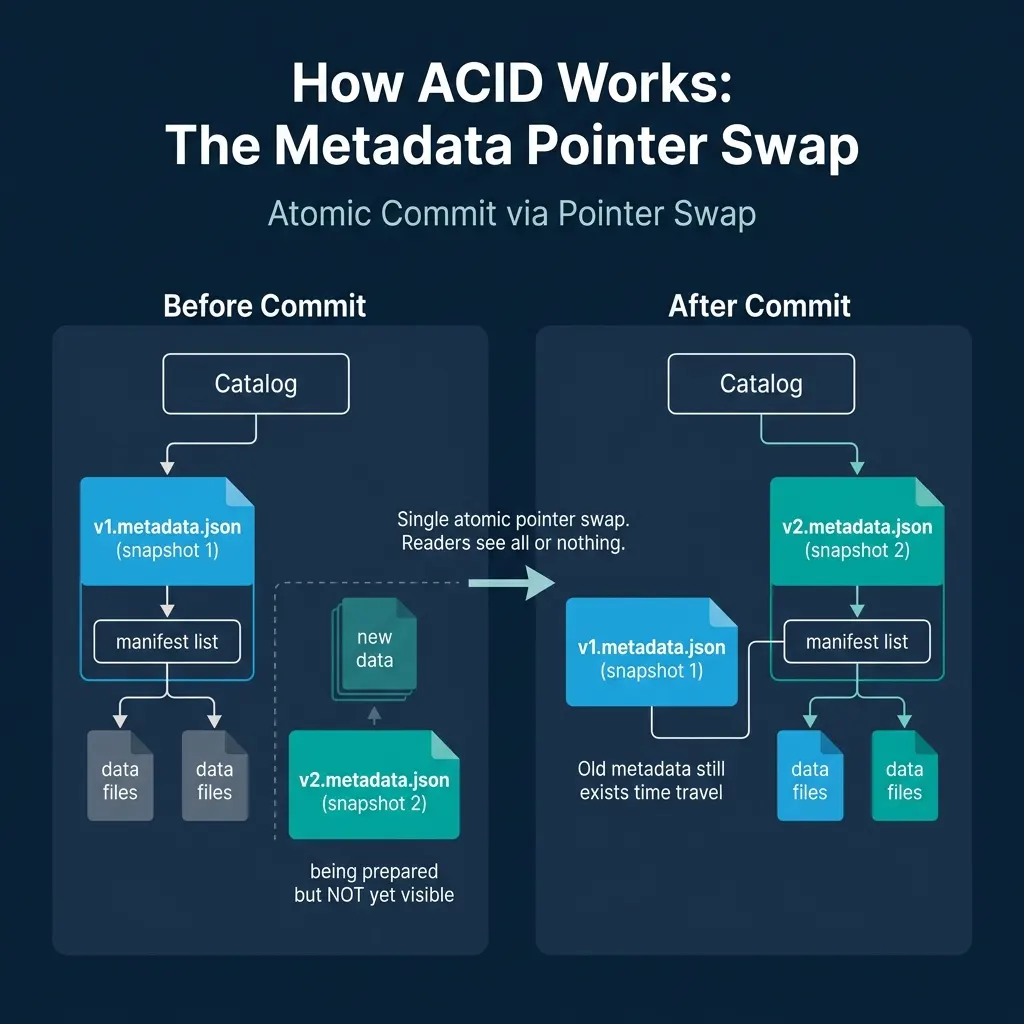
The pointer swap mechanism delivers all four ACID properties:
Atomicity. The entire write is visible or invisible. If the engine crashes after writing data files but before the pointer swap, the data files are orphans. They exist in storage but no metadata references them. Readers never see partial writes. A cleanup process (covered in Part 10) can remove these orphans later.
Consistency. The new metadata.json contains a valid schema, valid partition specs, and consistent statistics. The catalog only accepts the swap if the metadata file is well-formed.
Isolation. Readers load a specific snapshot and operate on it for the duration of their query. Even if a new snapshot is committed while they are reading, their query continues to see the snapshot they started with. This is snapshot isolation, and it happens naturally because each snapshot is immutable.
Durability. Once the catalog confirms the pointer swap, the new state is persisted. The metadata file and all data files are already in durable object storage. The catalog’s own persistence layer (a database for REST catalogs, a metastore for Hive) provides the durability guarantee for the pointer itself.
Concurrent Writes: Optimistic Concurrency Control
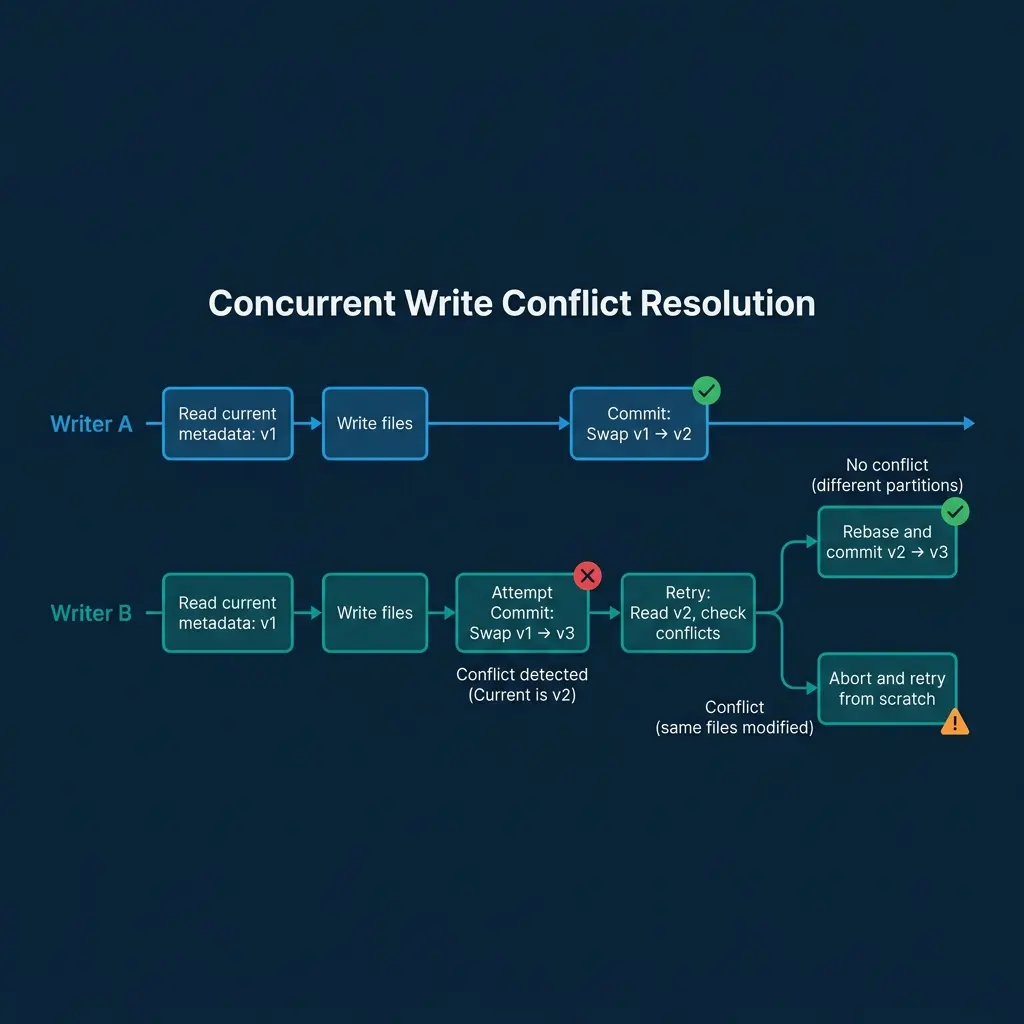
When two engines write to the same table simultaneously, Iceberg uses optimistic concurrency control (OCC):
-
Both writers read the current metadata (say
v1.metadata.json) and begin their writes independently. -
Writer A finishes first and successfully swaps the catalog pointer from
v1tov2. -
Writer B attempts to commit by swapping from
v1tov3. The catalog detects that the current pointer isv2, notv1. The swap fails. -
Writer B retries. It reads
v2.metadata.jsonand checks whether its changes conflict with Writer A’s changes:-
No conflict (different partitions): Writer B’s new files affect partition
region=west, and Writer A’s changes affectedregion=east. The changes are compatible. Writer B rebases its manifest list to include Writer A’s manifests and creates a newv3.metadata.jsonthat reflects both writes. The swap fromv2tov3succeeds. -
Conflict (same files modified): Both writers modified the same data files (e.g., both deleted rows from the same file). The changes cannot be automatically merged. Writer B’s operation fails with a conflict error.
-
This model works well for append-heavy workloads (multiple jobs writing to different partitions), which is the dominant pattern in data lakes. Dremio handles concurrent writes and automatic retries through its engine, and its Open Catalog provides the atomic compare-and-swap through the REST catalog protocol.
Delete and Update Operations
Iceberg supports three strategies for modifying existing rows:
Copy-on-Write (COW)
The engine reads the affected data files, removes or modifies the target rows, and writes entirely new files containing the result. The old files are removed from the manifest (marked as deleted), and the new files are added. This is simple but expensive for large files when only a few rows change.
Merge-on-Read (MOR) with Position Delete Files
Instead of rewriting data files, the engine writes a small “position delete file” that lists the file path and row positions of deleted rows. At read time, the engine reads both the data file and the delete file, filtering out deleted rows during scan. This makes writes fast but adds read-time overhead.
Merge-on-Read with Deletion Vectors (Iceberg v2+)
Deletion vectors are a compact bitmap representation of deleted rows within a file. They are more storage-efficient than position delete files and faster to evaluate during reads. Engines like Dremio and Spark use deletion vectors for row-level updates in production.
| Strategy | Write Cost | Read Cost | Best For |
|---|---|---|---|
| Copy-on-Write | High (rewrite files) | Low (clean files) | Infrequent bulk updates |
| Position Deletes | Low (small delete file) | Medium (merge at read) | Frequent targeted deletes |
| Deletion Vectors | Low (compact bitmap) | Low-Medium (bitmap check) | High-frequency row updates |
What Happens to Old Data?
After a commit, the previous snapshot’s data files are not deleted. They remain in storage and are referenced by the old snapshot. This enables:
- Time travel: Query the table as of any retained snapshot
- Rollback: Revert the table to a previous snapshot if a bad write is detected
- Incremental reads: Process only the files that changed between two snapshots
Eventually, old snapshots are expired (removed from the metadata) and their orphan files are cleaned up. This maintenance is covered in Part 10.
The Catalog’s Role in Commits
The catalog is the gatekeeper of consistency. Without a catalog providing atomic compare-and-swap, concurrent writers could overwrite each other’s commits. The choice of catalog affects write reliability:
- REST catalogs (Dremio Open Catalog, Polaris) provide server-side CAS operations
- Hive Metastore uses database-level locking for CAS
- AWS Glue provides CAS through its API
- Hadoop Filesystem catalogs use file-system rename atomicity (less reliable on object storage)
Part 7 covers the catalog landscape in detail.
Books to Go Deeper
- Architecting the Apache Iceberg Lakehouse by Alex Merced (Manning)
- Lakehouses with Apache Iceberg: Agentic Hands-on by Alex Merced
- Constructing Context: Semantics, Agents, and Embeddings by Alex Merced
- Apache Iceberg & Agentic AI: Connecting Structured Data by Alex Merced
- Open Source Lakehouse: Architecting Analytical Systems by Alex Merced